System Behaviour
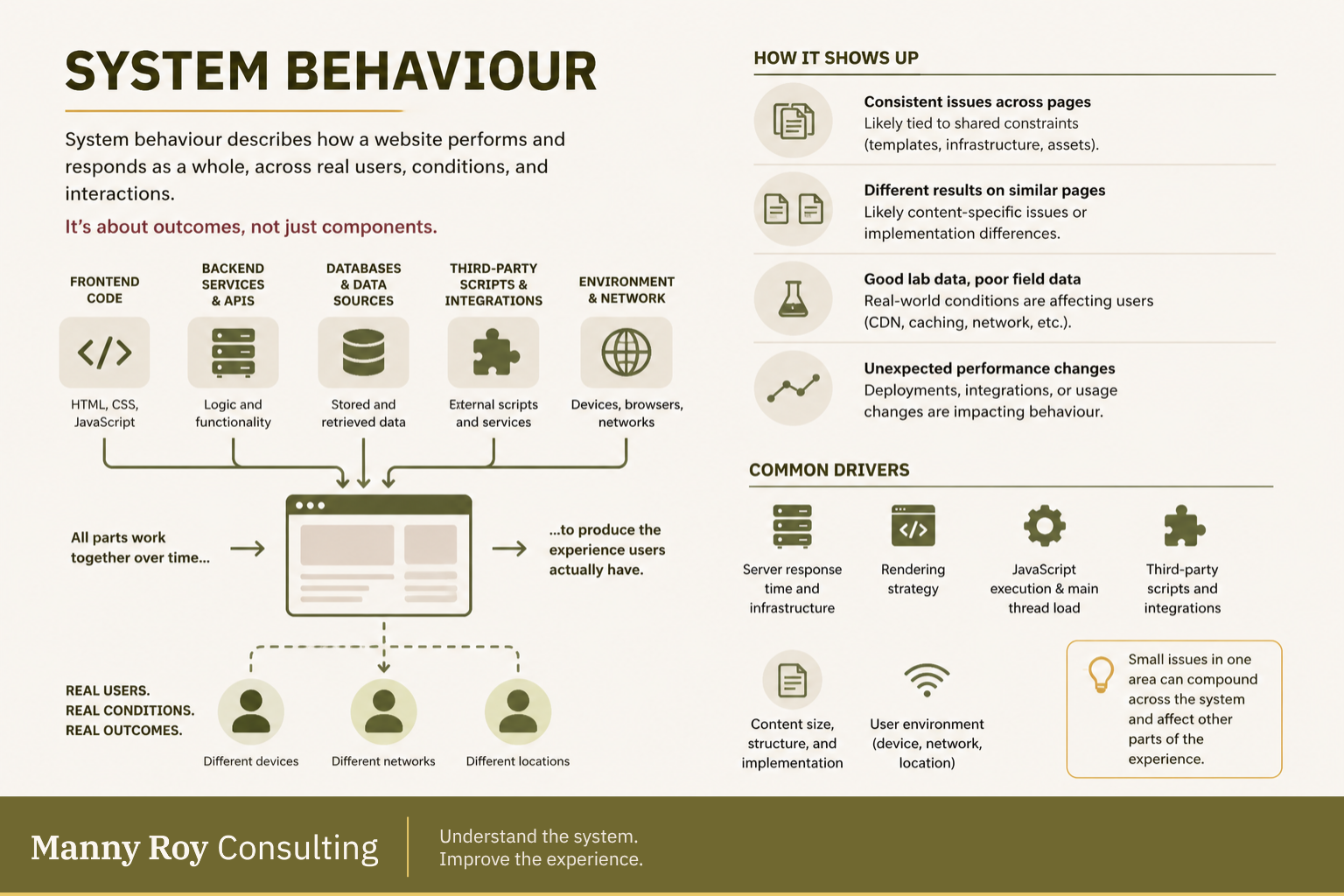
System behaviour describes how a website performs and responds as a whole, across real users, conditions, and interactions.
It focuses on outcomes as well as components, asking a holistic question: what is the system actually doing in practice?
What System Behaviour Means
In web development, a site is more than a code file or two. Websites are built on systems made up of:
- Frontend code (HTML, CSS, JavaScript)
- Backend services and APIs
- Databases and data sources
- Third-party scripts and integrations
- User devices, browsers, and networks
System behaviour defines how all of these parts work together over time. It reflects how pages load, how they respond to interaction, and how stable they remain during use across various environments.
Understanding system behaviour helps avoid unnecessary fixes, rework, and long-term complexity that result from "band-aid" level solutions.
Why System Behaviour Matters
Individual components can perform well on their own and still produce poor results when brought together.
For example:
- Fast frontend + slow server → delayed loading
- Optimized page + heavy third-party scripts → slow interaction
- Stable layout + dynamic inserts → unexpected shifts
System behaviour describes what users actually experience, not what we expect they'll experience.
This is why performance cannot be understood by looking at individual components alone; the whole is more than a sum of its pieces, it's a living network!
How to Recognize System Behaviour
System behaviour shows up in patterns across metrics, pages, and environments. That might seem overly simplified, but once you understand what each signal represents, the patterns fall into place.
For example:
- Consistent issues across pages
Likely lead back to shared constraints (code, templates, infrastructure, assets) - Different results on similar pages
Likely content-specific issues or implementation differences - Good lab data, poor field data
Real-world conditions are affecting users (CDN, caching, device) - Unexpected performance changes over time
Deployments, integrations, or usage changes are impacting system behaviour
These patterns help distinguish between isolated issues and system-level behaviour, which is the first step to true resolution.
Diagnosing System Behaviour with Core Web Vitals
Core Web Vitals offer a simplified way to observe and dig deeper into a website's system behaviour.
They capture the three most noticeable moments of a page visit:
- Loading: Largest Contentful Paint (LCP)
- Responsiveness: Interaction to Next Paint (INP)
- Visual stability: Cumulative Layout Shift (CLS)
From there, supporting metrics like Time to First Byte (TTFB) help explain system behaviour with more context (in this case, at the server level).
Analyzing metrics across various environments, devices, and users will help identify areas of concern. While these metrics won't fully describe what's happening in a system, they provide useful signals for tracing common patterns back to their driver.
Common Drivers of System Behaviour
System behaviour is shaped by interactions between components, like frontend and backend systems, or infrastructure and application logic. When diagnosing a system-level issue, you'll likely find yourself resolving one of these most common drivers:
- Server response time and infrastructure
- Rendering strategy (server-side vs client-side)
- JavaScript execution and main thread load
- Third-party scripts and integrations
- Content size, structure, and implementation
- User environment (device, network, location)
Regardless of the root cause, small issues in one area can compound across the system and wreak havoc in other areas that are expecting sound logic. For example, imagine one domino falling out of place in an elaborate maze of branching routes – some routes will fall into place just fine, while others won't "work" at all.
How to Work With System Behaviour
System behaviour is not always something to “fix” directly, but rather to diagnose and understand before acting. From there, a holistic strategy can be conceived that will remedy the issue for good without causing additional problems.
Here's a helpful approach:
- Start with user-facing metrics (like Core Web Vitals)
- Look for patterns across pages and time
- Identify shared constraints or bottlenecks
- Interpret results in context before making any changes
By analyzing the system's parts and how they interact, as well as the patterns across the components, you can understand how an isolated resolution will affect the whole. This strips your solution of the typical "fix one thing, break another" loop that many junior developers find themselves stuck in.
Read more about systems thinking at O'Reilly.com
Related Terms
- Core Web Vitals
- Largest Contentful Paint (LCP)
- Interaction to Next Paint (INP)
- Cumulative Layout Shift (CLS)
- Time to First Byte (TTFB)
- Perceived Performance
- Main Thread
- Bottleneck